Sunday, December 29, 2019
ny time article tracking location data
https://www.nytimes.com/interactive/2019/12/19/opinion/location-tracking-cell-phone.html

Monday, November 11, 2019
Rename all files in a folder with PowerShell
dir | rename-item -NewName {$_.name -replace ".xlsx", "-copy.xlsx"}
Friday, November 8, 2019
Excel : vlookup to ..lookup
How to lookup if a value in a given cell is present in a set of values?
Using VLOOKUP
=VLOOKUP(A1;H:H;1;FALSE)
Using VLOOKUP
=VLOOKUP(A1;H:H;1;FALSE)
Wednesday, September 25, 2019
R - Importing an Excel file
The R-library openxlsx offers a performant tool for importing Excel files.
Example for openxlsx::read.xlsx:
library(openxlsx)
openxlsx::read.xlsx(file,
sheet = 1,
colNames = T,
rows = seq(2,100)
Example for openxlsx::read.xlsx:
library(openxlsx)
openxlsx::read.xlsx(file,
sheet = 1,
colNames = T,
rows = seq(2,100)
This package performs better than the read.xlsx in package xlsx. However, there is one thing to notice: columns in date format will not be correctly handled by openxlsx::read.xlsx. The function xlsx::read.xlsx handles them correctly.
Example for xlsx::read.xlsx:
library(xlsx)
xlsx::read.xlsx(file,
sheetIndex = 1,
header = T,
rowIndex = seq(2,100)
There is also read.xlsx2 function in the library xlsx, which is written in java, and performs better than xlsx::read.xlsx.
library(xlsx)
xlsx::read.xlsx2(file,
sheetIndex = 1,
header = T,
rowIndex = seq(2,100)
Using the xslx functions requires that the environments is aware of the location of the java runtime:
Sys.setenv(JAVA_HOME='C:\\ieu\\java\\openjdk-11')
Example for xlsx::read.xlsx:
library(xlsx)
xlsx::read.xlsx(file,
sheetIndex = 1,
header = T,
rowIndex = seq(2,100)
There is also read.xlsx2 function in the library xlsx, which is written in java, and performs better than xlsx::read.xlsx.
library(xlsx)
xlsx::read.xlsx2(file,
sheetIndex = 1,
header = T,
rowIndex = seq(2,100)
Using the xslx functions requires that the environments is aware of the location of the java runtime:
Sys.setenv(JAVA_HOME='C:\\ieu\\java\\openjdk-11')
Tuesday, September 24, 2019
R: create a list of dataframes
gnr1 <- c("1111","4444", "3333","5555", "2222","9999")
gnr2 <- c("7777", "2222","1111","5555","3333","4444","8888")
prime1 <- c(1000, 4000, 3000, 5000, 2000, 9999)
prime2 <- c(7777, 2001, 1001, 5001, 3001, 4001,8888)
val1 <- c(1,2,3,4,5,6)
df1 <- data.frame(gnr1)
df2 <- data.frame(gnr2)
df1$prime <- prime1
df2$prime <- prime2
df1$val <- val1
mylist <- list()
mylist[[1]] <- df1
mylist[[2]] <- df2
gnr2 <- c("7777", "2222","1111","5555","3333","4444","8888")
prime1 <- c(1000, 4000, 3000, 5000, 2000, 9999)
prime2 <- c(7777, 2001, 1001, 5001, 3001, 4001,8888)
val1 <- c(1,2,3,4,5,6)
df1 <- data.frame(gnr1)
df2 <- data.frame(gnr2)
df1$prime <- prime1
df2$prime <- prime2
df1$val <- val1
mylist <- list()
mylist[[1]] <- df1
mylist[[2]] <- df2
Monday, September 23, 2019
R: DataFrames : creating a R Dataframe
# how to create a dataframe in r > diets <- data.frame ('diet'=1:4, 'protein'=c(0,0,1,1), 'vitamin'=c(0,1,0,1))
R: DataFrame: Selecting A Subset of a R Data Frame, merging.
Notes from the Tutorial "Meet The R Dataframe: Examples of Manipulating Data In R":
Use the ChickWeight dataset for this example
data("ChickWeight")
> head (ChickWeight)
weight Time Chick Diet
1 42 0 1 1
2 51 2 1 1
3 59 4 1 1
Selecting A Subset of a R Data Frame
1. using the function subset
> subset(ChickWeight, Diet==4)
2. with a conditional indexing
> ChickWeight[ChickWeight$Diet==4,]
3. using the function which
> ChickWeight[which((ChickWeight$Diet == 4) & (ChickWeight$Time==21)), names(ChickWeight) %in% c("weight","Time")]
Use the ChickWeight dataset for this example
data("ChickWeight")
> head (ChickWeight)
weight Time Chick Diet
1 42 0 1 1
2 51 2 1 1
3 59 4 1 1
Selecting A Subset of a R Data Frame
1. using the function subset
> subset(ChickWeight, Diet==4)
2. with a conditional indexing
> ChickWeight[ChickWeight$Diet==4,]
3. using the function which
> ChickWeight[which((ChickWeight$Diet == 4) & (ChickWeight$Time==21)), names(ChickWeight) %in% c("weight","Time")]
Wednesday, September 4, 2019
Outer join recap
Given the two tables COUNTRIES and LOCATIONS, in a 1-> m relationship, with a foreign key in the LOCATIONS table.
Not all the countries have a location child record.
These two statements illustrate the use of a left outer join:
1. Display all the records of LOCATIONS, and the related records in COUNTRIES:
select c.country_name, loc.*
from locations loc
left outer join countries c
on c.country_id = loc.country_id;
The result is equivalent (in this case) to a inner join, since no record in LOCATIONS have no parent in COUNTRIES.
2. Display all the records of COUNTRIES, and the related records in LOCATIONS (if any):
select c.country_name, loc.city
from countries c
left outer join locations loc
on c.country_id = loc.country_id
order by c.country_name;
COUNTRY_NAME NVL(LOC.CITY,'NULL')
------------------------------------ ------------------------------
Argentina NULL
Australia Sydney
Belgium NULL
Brazil Sao Paulo
...
Not all the countries have a location child record.
These two statements illustrate the use of a left outer join:
1. Display all the records of LOCATIONS, and the related records in COUNTRIES:
select c.country_name, loc.*
from locations loc
left outer join countries c
on c.country_id = loc.country_id;
The result is equivalent (in this case) to a inner join, since no record in LOCATIONS have no parent in COUNTRIES.
2. Display all the records of COUNTRIES, and the related records in LOCATIONS (if any):
select c.country_name, loc.city
from countries c
left outer join locations loc
on c.country_id = loc.country_id
order by c.country_name;
COUNTRY_NAME NVL(LOC.CITY,'NULL')
------------------------------------ ------------------------------
Argentina NULL
Australia Sydney
Belgium NULL
Brazil Sao Paulo
...
Tuesday, July 2, 2019
K-Nearest Neighbor Algorithm
Here's a good introduction to the k-nearest neighbor algorithm.
K-nearest neighbor is a supervised clustering algorithm. Can be used for classification and regression problems.
Example of a trivial classification problem: based on the age of the subject, determines if one like pineapple on his pizza:
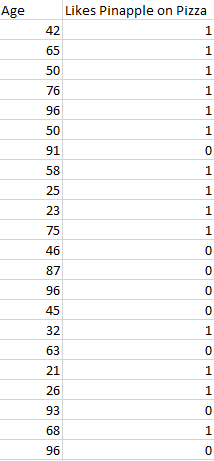
The output (label) of a classification algorithm is typically represented as an integer number such as 1, -1, or 0
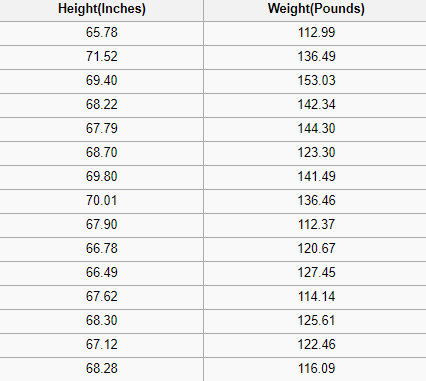
K-nearest neighbor is a supervised clustering algorithm. Can be used for classification and regression problems.
Example of a trivial classification problem: based on the age of the subject, determines if one like pineapple on his pizza:
The output (label) of a classification algorithm is typically represented as an integer number such as 1, -1, or 0
Example of a trivial regression problem: predict the weight of a person given their height:
Output of a regression problem is a real number
Thursday, June 27, 2019
Aborting a merge
I ran into a conflict while merging, and wanted to abort my merge.
git reset --hard HEADMonday, June 3, 2019
Bayes Theorem
In short:
P(B|A) = P(A|B) * P(A) / P(B)
see introductory articles:
https://towardsdatascience.com/naive-bayes-classifier-81d512f50a7c
P(B|A) = P(A|B) * P(A) / P(B)
see introductory articles:
https://towardsdatascience.com/naive-bayes-classifier-81d512f50a7c
Wednesday, May 29, 2019
R : remplace a String
I have a DataFrame sampleUvg50 with a column GNR in this format:
=TEXT(12040373;00000000)
And I would like to get rid of the parts "=TEXT(" and ";00000000)"
To obtain a string replacement in R, I can use the gsub function with a reg exp as follow:
sampleUvg50$GNR <- gsub(";\\d*\\)", "", gsub("=TEXT\\(", "", sampleUvg50$GNR));
=TEXT(12040373;00000000)
And I would like to get rid of the parts "=TEXT(" and ";00000000)"
To obtain a string replacement in R, I can use the gsub function with a reg exp as follow:
sampleUvg50$GNR <- gsub(";\\d*\\)", "", gsub("=TEXT\\(", "", sampleUvg50$GNR));
Friday, May 24, 2019
R: select from data frame (join types):
Selecting data in Data Frame with dplyr:
Find entries in List that are in another list
df1 %>%
inner_join(df2, by="myColumn")
Find entries in List that are not in another list
df1 %>%
anti_join(df2, by="myColumn")
Wednesday, May 15, 2019
Naive Bayes Classifier
The basic asumption when using a Naive Bayes classifier is that each feature pair being classified is independant of each other and contributes equally to the outcome.
They require a small amount of training data to estimate the necessary parameters.
Naive Bayes learners and classifiers can be extremely fast compared to more sophisticated methods.
Thursday, April 4, 2019
Remove docker imagers referenced in several repositories
I recently was confronted with a problem I though needed that I delete all my docker images. So I issued the classical command:
- docker rmi $(docker images -q)
Unfortunately, it looked like some images had the same id:
Subscribe to:
Comments (Atom)